Showing posts with label skyrim. Show all posts

Saturday, 15 February 2025

Skyrim SE - ELLE Apothecary Mod | Features, Installation & Guid


Skyrim is known for its vast world and endless customization options, and thanks to the modding community, players can tweak nearly every aspect of the game. One such mod that enhances immersion while adding a touch of realism is the ELLE - Apothecary Mod. This unique armor addition introduces a physics-enabled belt, customizable components, and a crafting system, making it an excellent choice for players who love detailed customization.


What is the ELLE - Apothecary Mod?

The ELLE - Apothecary Mod is a light armor set with customizable elements designed for immersive roleplay. It features belt physics using SMP technology, allowing realistic movement as the player moves. With two color variants (white and brown) and multiple customization options, this mod offers a visually appealing and lore-friendly addition to Skyrim's world.

Key Features:

  • Physics-Enabled Belt (SMP) – Adds realistic movement for a more immersive experience.

  • Two Color Variants – Choose between white or brown to match your character's style.

  • Custom Ground Meshes with Correct Collisions – No more fear of game crashes when dropping gear!

  • FOMOD Installer Options – Pick between realistic or regular body physics during installation.

  • ESL Flagged – Won't take up space in your mod limit.

  • Total of 6 Customizable Pieces – Mix and match for ultimate character personalization.

  • Craftable at a Tanning Rack – Obtainable through crafting, adding a natural progression element.


Why This Mod is a Must-Have

In a game where immersion and realism play a massive role in storytelling, having gear that actually moves and reacts to the player's motion makes a significant impact. This mod brings that little extra polish and detail that makes your character feel more alive in the game world.

Beyond aesthetics, the customization options ensure that the mod integrates seamlessly with different playstyles and character builds. Whether you’re a roaming alchemist, a herbalist adventurer, or simply someone who enjoys having a detailed outfit, the ELLE - Apothecary Mod delivers on all fronts.


How to Install the ELLE - Apothecary Mod

Installing this mod is straightforward, whether you’re a seasoned modder or a newcomer to Skyrim Special Edition’s modding scene.

Steps to Install:

  1. Download the Mod – Get the files from here.

  2. Use a Mod Manager – Installing through Mod Organizer 2 (MO2) or Vortex is highly recommended.

  3. Run the FOMOD Installer – Choose your preferred body physics (realistic or regular) and color options.

  4. Enable the Mod – Activate the plugin in your mod manager.

  5. Launch Skyrim & Test – Find the crafting manual in Winterhold - The Frozen Hearth, or spawn it using console commands.


Compatibility & Performance

One of the best things about the ELLE - Apothecary Mod is that it’s lightweight and ESL-flagged, meaning it won’t affect your mod limit. It’s also designed with maximum compatibility in mind, ensuring it won’t conflict with major armor overhaul mods.

Compatible With:

  • Body Physics Mods – Works alongside 3BA, BHUNP, and CBBE.

  • Texture Overhauls – Blends well with ENB presets and lighting mods.

  • Immersive Clothing & Armor Mods – Adds variety without replacing vanilla outfits.

Performance Impact:

  • Minimal FPS Drop – The physics effects are optimized to run smoothly.

  • No Script Bloat – Uses SMP technology without adding unnecessary scripts.

  • Stable Collisions – Items have proper ground meshes, reducing chances of crashes.


How This Mod Enhances Skyrim

Skyrim’s default outfits are great, but they lack movement and detail. With the ELLE - Apothecary Mod, you get fluid motion, customization options, and high-quality textures, bringing your character closer to a real-world aesthetic.

How It Improves Gameplay:

  • Enhances Roleplaying – Perfect for characters who are alchemists, healers, or scholars.

  • Provides Customization – Choose from six different pieces and two color variants.

  • Integrates Seamlessly – Designed to fit within Skyrim’s lore without feeling out of place.


Should You Download It?

Absolutely. If you’re the type of player who loves immersive gear, this mod is a perfect fit. The physics, customization, and realistic crafting method make it one of the best light armor mods available for Skyrim SE.

However, if you’re more into heavy armor builds or combat-focused gear, this may not be your first pick. But for those who love detailed outfit mods, this is one you don’t want to miss.


Final Thoughts

The ELLE - Apothecary Mod is an outstanding addition to Skyrim’s modding scene, providing realistic physics, customization, and immersion in a lightweight, performance-friendly package. With its SMP-enabled belt, ESL flagging, and high compatibility, this is one of the best outfit mods available for players who love immersive apparel.

If you’re looking for aesthetic enhancements that don’t break the game, this mod is a must-have. Whether you’re an alchemy-loving roleplayer or just want a detailed, high-quality outfit, this is one of the best Skyrim armor mods to date.

Skyrim SE - Immersive Weapon Switch Mod | Realistic Combat Overhaul


There’s something undeniably satisfying about quickly swapping between weapons mid-battle, but let’s be honest—Skyrim’s default system makes it feel like characters have an invisible third hand. If you’ve ever thought, “Wait, how did I just pull out a greatsword while still holding a bow?”, then the Immersive Weapon Switch - SKSE Plugin is here to fix that immersion-breaking moment.


What is the Immersive Weapon Switch Mod?

This mod adds a realistic weapon-swap mechanic to Skyrim by ensuring that both the player and NPCs must sheathe their current weapon before drawing a new one. This change introduces an extra layer of realism and tactical decision-making into combat scenarios.

Key Features:

  • Forces Weapon Sheathing – No more insta-switching from a battleaxe to a dagger without a proper animation.

  • Affects Both Players & NPCs – Keeps combat fair and immersive.

  • Seamless Integration – Works with all weapon types, including bows, staves, and magic.

  • SKSE Plugin – Ensures smooth functionality without excessive script load.


Why This Mod Makes Skyrim Better

Skyrim is beloved for its open-ended combat system, but let’s face it—the weapon-swapping mechanic is pure fantasy. Warriors shouldn’t be able to instantaneously materialize a warhammer while still swinging a sword. With this mod, weapon switching feels like an intentional action rather than a gamey exploit.

Here’s how it enhances gameplay:

  • Tactical Combat – You’ll have to plan ahead before changing weapons mid-fight.

  • Increased Immersion – Combat looks and feels more believable.

  • No Unfair AI Behavior – NPCs also have to follow the same weapon-swap rules.


How to Install the Mod

Installing the Immersive Weapon Switch - SKSE Plugin is simple and hassle-free.

Steps to Install:

  1. Download the Mod – Get the files from here.

  2. Ensure SKSE is Installed – This mod requires SKSE (Skyrim Script Extender) to function.

  3. Use a Mod Manager – Install using Mod Organizer 2 or Vortex for best results.

  4. Enable the Mod – Activate it in your load order and launch the game.

  5. Test the New Weapon Swap Mechanic – Try drawing different weapons in combat and watch the realism unfold.

Compatibility & Performance

One of the biggest advantages of this mod is that it’s an SKSE plugin, meaning it doesn’t rely on heavy scripting that could cause performance issues. It’s also compatible with most combat and animation mods, making it an ideal addition to immersive playthroughs.

Compatible With:

  • Combat Overhauls – Works alongside mods like Wildcat, Smilodon, and Ultimate Combat.

  • Animation Mods – Pairs well with Dynamic Animation Replacer and other movement tweaks.

  • Magic & Archery Mods – Doesn’t interfere with spellcasting or ranged combat.

Performance Impact:

  • Minimal FPS Drop – Since it runs via SKSE, the performance footprint is negligible.

  • No Save Bloat – Doesn’t permanently alter NPCs or scripts.

  • Lightweight – Only modifies weapon draw/sheathe behavior without unnecessary complexity.


How Does This Change Skyrim’s Combat?

This mod fundamentally alters how you approach battles. Previously, you could switch between weapons instantly, allowing you to exploit enemy weaknesses on the fly. With this mod, every weapon change becomes a deliberate choice.

  • Switching from a bow to a sword? You’ll have to sheathe the bow first.

  • Trying to switch mid-swing? Better think twice, because you’ll be vulnerable for a moment.

  • Fighting an enemy mage? If they swap to a dagger, they’ll need to put away their staff first.

This creates more engaging, strategic combat scenarios where weapon timing matters.

Who Should Use This Mod?

If you enjoy realistic, immersive gameplay, this mod is a must-have. It’s perfect for:

  • Roleplayers – Adds a natural touch to how characters handle weapons.

  • Hardcore Players – Introduces an extra challenge to combat strategy.

  • Immersion Enthusiasts – Removes the awkward, unrealistic weapon swapping.

If you prefer fast-paced arcade-style combat, then this mod might not be for you. But for those who want realism and better game balance, it’s an essential mod.


Should You Download It?

Absolutely. The Immersive Weapon Switch Mod takes one of Skyrim’s most unrealistic mechanics and makes it feel organic, immersive, and balanced. If you’re tired of seeing enemies pull weapons out of nowhere—or if you just want combat to feel more grounded—this is a fantastic addition to your load order.

Final Thoughts

The Immersive Weapon Switch - SKSE Plugin is a subtle yet powerful improvement that transforms how weapon swapping works in Skyrim. By ensuring that weapons must be sheathed before switching, the game becomes more immersive, realistic, and engaging.

With zero performance issues, full compatibility with major combat mods, and a lightweight SKSE-based implementation, there’s no reason not to try it. Whether you’re a hardcore warrior, a stealthy assassin, or a strategic mage, this mod forces you to think before switching weapons, making every fight more rewarding.

Skyrim SE - Random Faces of Skyrim Mod | NPC Appearance Overhaul

One of Skyrim’s biggest quirks is how NPCs start looking eerily familiar after a while. Whether it’s bandits, town guards, or random villagers, they all seem to have come from the same suspiciously small gene pool. If you’ve ever wondered why every single highwayman looks like his long-lost twin, the Random Faces of Skyrim Mod is here to break the curse of copy-paste NPCs!

What is the Random Faces of Skyrim Mod?

This mod does exactly what it promises: randomizes NPC appearances to add variety and make encounters feel fresh. Thanks to SkyPatcher integration, the mod ensures that changes are applied dynamically while maintaining full compatibility with other NPC-enhancing mods.

Key Features:

  • Unique NPC Looks – No more seeing the same face on every bandit you fight.

  • SkyPatcher Powered – Ensures high compatibility with other mods.

  • Lightweight and Efficient – Doesn’t drastically alter the game’s performance.

  • More Realism & Immersion – Encounters feel fresh rather than repetitive.

Why is This Mod a Game-Changer?

Think about it—Skyrim is a huge open-world game with hundreds of hours of content, but after a while, you start recognizing the same NPC templates across different factions. That illusion of a living, breathing world? Shattered.

With this mod, however, every playthrough will feel different. You’ll encounter new and unique-looking NPCs every time, making exploration and combat far more interesting. It’s a small change with a big impact.


How to Install the Mod

Installing this mod is as easy as looting a fallen bandit’s gear.

Steps to Install:

  1. Download the Mod – Get the files from here.

  2. Install Using a Mod Manager – Use Mod Organizer 2 or Vortex for the best results.

  3. Ensure SkyPatcher is Installed – The mod relies on SkyPatcher to dynamically apply changes.

  4. Activate the Mod – Enable it in your mod manager and check load order.

  5. Launch Skyrim SE & Enjoy – Witness NPC variety like never before!

Compatibility & Performance

The Random Faces of Skyrim Mod is designed to be highly compatible with other NPC-enhancing mods. Since it only modifies appearance data dynamically, it won’t interfere with AI behavior, voice lines, or any other essential game mechanics.

Performance Impact:

  • Minimal FPS Drop – Since it’s not adding thousands of new models, performance remains stable.

  • Compatible with Overhauls – Works alongside NPC replacers and texture mods.

  • No Save Corruption – Since the changes are procedural, it won’t permanently alter NPCs in saved games.


How Does This Improve Skyrim’s Gameplay?

This mod isn’t just about making NPCs look different—it has an impact on how the world feels. Here’s how it improves your Skyrim experience:

  • Combat Feels Fresh – No more fighting the same recycled bandit faces over and over.

  • Towns Feel More Alive – Unique NPCs mean Whiterun doesn’t feel like it’s full of clones.

  • Encounters Feel Unpredictable – Every bounty hunter, thief, or assassin has a distinct look.

For those who enjoy roleplaying or immersive gameplay, this mod is a must-have. It fixes an issue that many didn’t even realize was a problem until seeing the difference firsthand.

Should You Download It?

If you’re looking for small changes that make a big impact, this mod is a no-brainer. It doesn’t mess with Skyrim’s core mechanics, doesn’t add unnecessary bloat, and works with other NPC mods. In short, it’s a fantastic quality-of-life improvement for anyone who wants a more immersive experience.


Final Thoughts

The Random Faces of Skyrim Mod takes something that’s been an unspoken issue in Skyrim for years and fixes it in a simple yet effective way. By ensuring every bandit, mercenary, and guard has a unique appearance, the game world feels more alive, diverse, and engaging.

For those who have spent hundreds of hours in Skyrim, this is the kind of subtle yet impactful upgrade that keeps the game feeling fresh. Whether you’re starting a new playthrough or adding to an existing one, this mod is a must-try.

Skyrim SE - Time Priestess Outfits Mod | Features & Installation Guide


Skyrim Special Edition is no stranger to impressive modding creations, and if there’s one thing the modding community does well, it’s crafting stunning, immersive outfits. Enter the Time Priestess Outfits of the Birth and the Death, a visually striking armor set that adds mystical elegance to your Dragonborn’s wardrobe. Whether you’re roleplaying a divine spellcaster or just want to add some flair to your character, this mod is a fantastic addition to the game.


What is the Time Priestess Outfits Mod?

This mod is a rework of the original Time Priestess outfit, featuring multiple improvements such as:

  • BHUNP Conversion – Fully compatible with BHUNP body types.

  • Cleaner 3BA Sliders & Physics – Improved physics settings for a more natural look.

  • SMP Physics for Skirts – Adds realistic movement to the skirts in the Priestess of Death outfit.

  • English Translation – No more guessing what each item does!

  • Adjustment Sliders – Fine-tune the Circlet, Veil, and both sets of earrings for the perfect fit.

The mod features two primary versions of the outfit:

  • White and Gold Variant – Ideal for celestial, divine, or noble character builds.

  • Black and Silver Variant – A darker, edgier look for more mysterious characters.


Why This Mod Stands Out

With thousands of armor and outfit mods available, you might wonder what makes this one special. Here’s why it deserves a spot in your mod list:

  • Physics-Based Movement – The SMP-enabled skirts flow naturally as your character moves, adding an extra layer of realism.

  • Highly Customizable – With BHUNP and 3BA compatibility, you can adjust the outfit to fit your preferred body type.

  • Perfect for Roleplaying – Whether you’re playing as a divine priestess, a time-traveling mage, or a noblewoman, this outfit blends beautifully into Skyrim’s world.

  • Seamless Integration – The translated menu options ensure that everything is easy to understand and use.


How to Install the Mod

Steps to Install:

  1. Download the Mod – Get the files from here.

  2. Use a Mod Manager – It’s highly recommended to install the mod using Mod Organizer 2 or Vortex.

  3. Install Required Dependencies – Ensure you have BHUNP, 3BA, and SMP Physics installed to take full advantage of the mod’s features.

  4. Enable the Mod – Activate it in your mod manager and check your load order.

  5. Launch Skyrim SE & Equip the Outfit – Use the console (help "Time Priestess") or craft it at a forge (if applicable).


Compatibility & Performance

The Time Priestess Outfits mod is designed to be as compatible as possible with other outfit mods. Since it only modifies outfit assets and parameters, you shouldn’t experience conflicts unless you have another mod that alters the same outfit textures or physics settings.

Additionally, the performance impact is minimal, even with SMP physics enabled. If you experience FPS drops, you can tweak the physics settings in your mod manager to optimize performance.


How Does This Mod Enhance Skyrim?

The base game’s armor options are pretty limited when it comes to elegant and mystical outfits. This mod fills a crucial gap, providing a beautifully detailed and lore-friendly alternative that fits seamlessly into Skyrim’s aesthetic.

  • For Mages & Priests: This outfit is perfect for magic-based characters who want a more refined look.

  • For Roleplayers: Whether you’re building a goddess-like Dragonborn or a dark priestess, the color variants let you choose between light and dark themes.

  • For Mod Enthusiasts: If you love collecting unique armor sets, this mod is a great addition to your collection.


Should You Download It?

If you’re looking for an outfit that’s graceful, high-quality, and immersive, the Time Priestess Outfits mod is a fantastic choice. The attention to detail, combined with the customization options, makes it a top-tier wardrobe upgrade for any Skyrim SE player.

However, if you prefer heavy armor builds or more practical warrior outfits, this might not be your first pick. But if you’re even slightly interested in character aesthetics and roleplaying, this is a must-download mod.


Final Thoughts

The Time Priestess Outfits of the Birth and the Death mod is one of the most impressive and well-crafted clothing mods available for Skyrim SE. With realistic physics, high compatibility, and elegant design, it’s an essential addition for anyone looking to enhance their character’s wardrobe.

Whether you’re playing as a light-wielding celestial priestess or a mysterious dark mage, the white and gold and black and silver variants provide thematic options to match your roleplaying style. Plus, the SMP physics ensure that your outfits move naturally, making the game world feel even more immersive.

With easy installation, seamless integration, and excellent customization options, this mod is a no-brainer for anyone who loves beautiful, functional outfit mods in Skyrim SE.

Friday, 14 February 2025

Skyrim SE – FOMOD Plus: Remember Mod Installation Choices in MO2

Modding Skyrim Special Edition is a time-consuming art. If you’ve ever had to reinstall a FOMOD-based mod, you’ve probably struggled to remember which choices you made last time.

Enter FOMOD Plus - Remember Installation Choices, a plugin for Mod Organizer 2 that remembers your selections, highlighting them during future installations and even auto-selecting them for you if desired.

For anyone who regularly updates or reinstalls mods, this plugin eliminates guesswork, making Skyrim modding faster, smoother, and way less frustrating.


What Does the FOMOD Plus Plugin Do?

This lightweight yet powerful plugin improves FOMOD mod installations in MO2 by:

🔹 Key Features:

  • Highlights Previously Selected Options – Your last choices appear with a green background, making them easy to find.
  • Auto-Selects Previous Choices (Optional) – Let MO2 automatically choose your last settings for a faster installation.
  • Customizable UI Colors – Modify the highlight colors to fit your personal style and visibility preferences.
  • Works Seamlessly in Mod Organizer 2 – No extra tools required; just install and enjoy smarter FOMOD handling.

If you frequently tweak your load order, this mod will save you tons of time.


Why You Need This Plugin

1. No More Guessing During Reinstalls

  • Ever reinstalled a mod and couldn’t remember what settings you picked last time?
  • This plugin remembers for you so you never have to guess again.

2. Speed Up Modding with Auto-Selection

  • If enabled, FOMOD Plus can automatically apply previous choices, letting you skip unnecessary clicks.

3. Perfect for Mod Updates & Adjustments

  • When a mod updates, you often need to reinstall it manually.
  • This plugin ensures you get the same settings as before, avoiding unwanted changes.

4. Fully Customizable UI Highlights

  • Change the colors for different states:
    • Green = Previous selections
    • Yellow = Different from last install
    • Custom colors for disabled options

5. Lightweight & Fully Integrated with MO2

  • No performance impact—it simply enhances MO2’s existing FOMOD installer.

If you love Skyrim modding but hate repeating tedious steps, this is a must-have plugin.


How to Install FOMOD Plus - Remember Installation Choices

Installing this plugin for Mod Organizer 2 is quick and easy.

🛠️ Step-by-Step Installation Guide:

1️⃣ Download the plugin from this link.

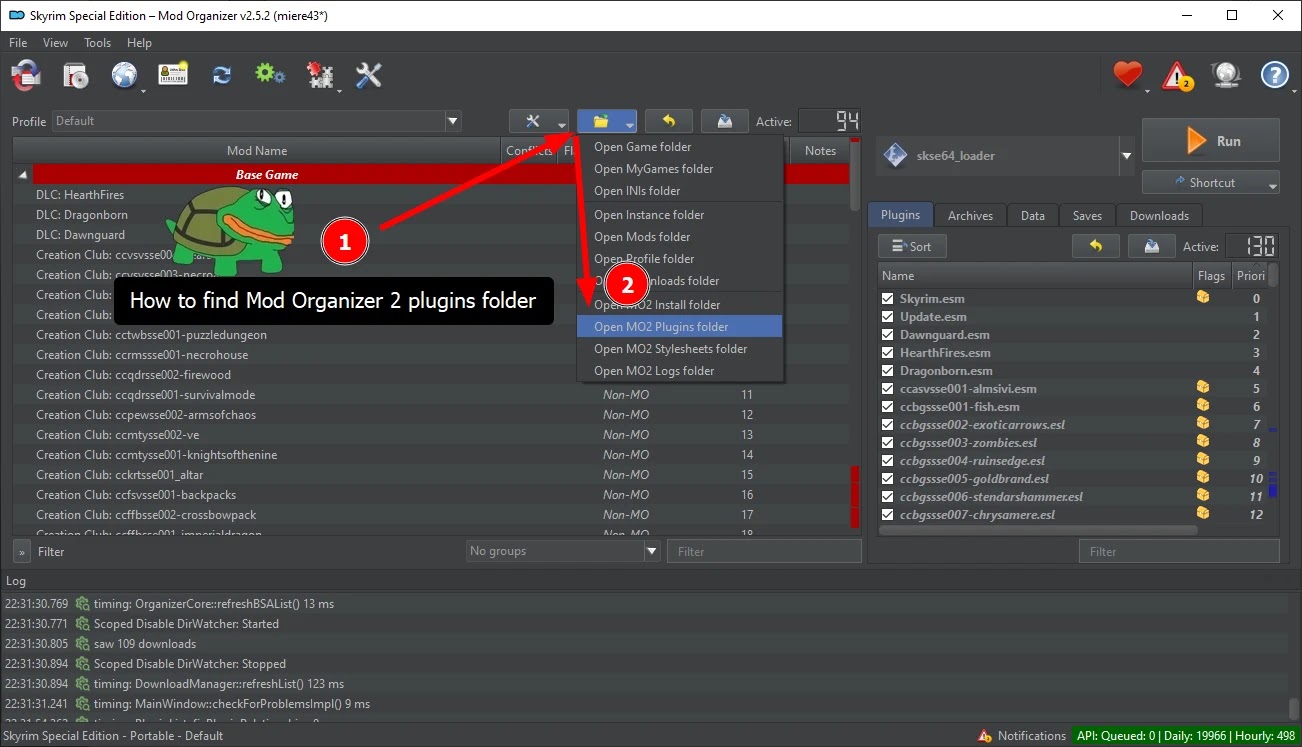
2️⃣ Locate Your Mod Organizer 2 (MO2) Folder

  • Typically found in:
    makefile

    C:\Modding\ModOrganizer\plugins

3️⃣ Extract the Plugin Files

  • Open the downloaded ZIP file.
  • Copy the folder "remember_installation_choices" into:
    bash

    <Mod Organizer 2 folder>/plugins

4️⃣ Enable the Plugin in MO2

  • Open MO2 and go to Settings > Plugins.
  • Find "Python Proxy" and enable it (if not already).
  • Locate "Remember Installation Choices" and ensure it’s listed and active.

5️⃣ Restart MO2 & Enjoy Automatic Install Tracking!

💡 Want to remove the plugin? Simply delete the folder from plugins, and MO2 will return to default behavior.


How the Plugin Works

FOMOD Plus doesn’t alter mod files or settings—it just enhances how MO2 handles FOMOD-based installs.

🔹 What It Changes:
✔️ Highlights previous selections in the FOMOD installer.
✔️ Auto-selects options if enabled.
✔️ Lets you customize UI highlight colors.

🔹 What It Doesn’t Change:
❌ Doesn’t modify mod files or settings—just UI behavior in MO2.
❌ Doesn’t force auto-selection unless you enable it.
❌ Doesn’t alter gameplay or compatibility.

It’s purely a quality-of-life upgrade, making mod management easier.


Common Issues & Fixes

This plugin is stable, but here’s how to troubleshoot common issues:

🔹 Plugin Not Appearing in MO2?

  • Double-check that the "remember_installation_choices" folder is inside plugins.
  • Restart MO2 and recheck the Plugins tab.

🔹 Auto-Selection Not Working?

  • Open Settings > Plugins and enable "auto_select_previous_choices".

🔹 MO2 Language Change Breaks Selections

  • If you change the MO2 UI language, the plugin may not recognize previous selections.

🔹 Game Updates Overwriting MO2 Plugins?

  • If MO2 updates remove custom plugins, simply reinstall the plugin.


Final Thoughts: Should You Download This Plugin?

If you mod Skyrim regularly and want a smoother installation process, the FOMOD Plus Plugin is a must-have upgrade for MO2.

✔️ Pros:
✔️ Saves previous install choices—no more guessing.
✔️ Auto-selects past choices (if enabled) for quick installs.
✔️ Easy installation & lightweight—won’t slow MO2.
✔️ Customizable UI colors to match preferences.

Cons:
MO2 language changes may cause issues.
Doesn’t work with non-FOMOD mods.

For serious Skyrim modders, this streamlines installations and saves time.

So, if you’re ready to take the frustration out of reinstalling mods, download the plugin today and make Skyrim modding easier than ever!


Stay connected with all our latest updates by following us on Google News! It only takes a click, and it would mean a lot to us. Thanks for your support! 🙌

Skyrim SE – FOMOD Plus: A Better Mod Installation Experience for MO2


Modding Skyrim Special Edition is a rewarding but sometimes frustrating experience. Anyone who’s spent hours setting up a perfect load order knows the pain of reinstalling FOMOD-based mods, trying to remember what options were chosen last time.

Enter FOMOD Plus, a game-changer for Mod Organizer 2 users that reworks the entire FOMOD installation experience. This mod enhances usability, remembers previous selections, and makes installing and managing mods smoother than ever before.

If you mod Skyrim regularly, this is an essential tool that will save you time and effort while keeping your modlist organized and efficient.


What Does FOMOD Plus Do?

FOMOD Plus is a complete overhaul of the traditional FOMOD installer experience inside Mod Organizer 2 (MO2). It adds a ton of quality-of-life improvements, making it easier, faster, and smarter.

🔹 Key Features:

  • Remembers Previous Choices – No more guessing what options you picked last time.
  • One-Click Restore – Select previously installed options where possible.
  • Filter Your Mod List by FOMOD-Installed Mods – Quickly see which mods were installed via FOMOD.
  • Scan & Auto-Detect Mods – A scanner plugin retroactively marks mods as FOMOD-installed, even for old installs.
  • Non-Blocking Installer Window – The FOMOD window no longer locks up MO2, so you can check other mods mid-installation.
  • Smart Resizing & Persistent UI Settings – Adjust window sizes and splitters, and they stay saved between installs.
  • Rename Mods Without Losing FOMOD Data – Keep previous selections even after renaming mods.

This mod completely changes how you interact with FOMOD-based mods, making Skyrim modding smoother and more intuitive.

Why You Need This Mod

1. Never Forget Your Previous Install Choices Again

  • Ever reinstalled a mod and couldn’t remember which options you picked last time?
  • FOMOD Plus stores previous selections, so you never have to guess again.

2. Install Mods Faster and More Efficiently

  • Avoid unnecessary clicks—previous choices can be selected with one button.
  • No more digging through readme files just to recreate your ideal install.

3. Keep Your Mod List Organized

  • Filter mods by FOMOD installation, making it easier to manage and update your load order.

4. No More Annoying UI Lock-Ups

  • Normally, FOMOD installers block the entire MO2 window while running.
  • With FOMOD Plus, you can switch between the installer and MO2 freely.

5. Works with All MO2-Compatible Mods

  • Fully compatible with any mod using FOMOD installers, including major overhauls and texture packs.

If you love modding Skyrim but hate the tediousness of reinstalling mods, FOMOD Plus is a lifesaver.


How to Install FOMOD Plus

Setting up FOMOD Plus is quick and easy.

🛠️ Step-by-Step Installation Guide:

1️⃣ Download the mod file from this link.

2️⃣ Locate Your Mod Organizer 2 (MO2) Folder

  • Typically found in:
    makefile

    C:\Modding\ModOrganizer\plugins

3️⃣ Extract the Mod Files

  • Open the downloaded ZIP file.
  • Extract the contents into your MO2 plugins directory.

4️⃣ Launch Mod Organizer 2

  • If it’s your first time using FOMOD Plus, run the scanner to populate existing FOMOD installs.

5️⃣ Install Mods Normally and Enjoy the New Features!

  • Test out the new FOMOD installer UI and see how much easier modding becomes.

💡 Want to remove the mod? Simply delete the extracted FOMOD Plus folder from plugins, and MO2 will revert to its default FOMOD behavior.


How the Mod Works

FOMOD Plus enhances how Mod Organizer 2 handles FOMOD-based mod installations, without changing how mods themselves function.

🔹 What It Changes:
✔️ Remembers previous install settings.
✔️ Speeds up mod reinstalls with one-click restore.
✔️ Allows for better filtering and organization.
✔️ Improves UI with non-blocking windows and smart resizing.

🔹 What It Doesn’t Change:
❌ Doesn’t modify how mods work—just how they’re installed.
❌ Doesn’t affect non-FOMOD-based mods.
❌ Doesn’t force any compatibility issues with MO2.

It’s simply a massive upgrade for mod installation efficiency.


Does This Mod Break Anything?

Not at all! FOMOD Plus is purely a UI and functionality improvement.

🎮 Why It’s Balanced:

✔️ Doesn’t interfere with mod functionality—just improves MO2’s handling of FOMODs.
✔️ Doesn’t auto-select settings for you—just remembers your choices.
✔️ Makes Skyrim modding more efficient without affecting gameplay.

If you’re deep into modding and want a better installation process, this mod is a must-have.


Common Issues & Fixes

This mod is stable and well-optimized, but if you encounter any issues, here’s how to fix them:

🔹 FOMOD Plus Not Showing in MO2?

  • Ensure the mod files are correctly placed in the plugins directory.
  • Restart MO2 after installation.

🔹 Scanner Not Detecting Old FOMOD Installs?

  • Try running the scanner again after restarting MO2.

🔹 Game Updates Overwriting MO2 Plugins?

  • Reinstall FOMOD Plus if an MO2 update removes plugins.


Final Thoughts: Should You Download This Mod?

If you love modding Skyrim but hate the hassle of reinstalling FOMOD-based mods, the FOMOD Plus Mod is an absolute must-have.

✔️ Pros:
✔️ Remembers previous mod install choices.
✔️ Speeds up FOMOD installs and reinstalls.
✔️ Keeps modlist organized and filterable.
✔️ Eliminates UI lock-ups in MO2.

Cons:
Only works with FOMOD-based mods (not standard manual installs).
MO2 updates may require reinstalling the plugin.

For serious modders looking to streamline Skyrim modding, this is one of the best quality-of-life mods available.

So, if you’re ready to take the frustration out of mod installation, download the mod today and make Skyrim modding easier than ever!


Stay connected with all our latest updates by following us on Google News! It only takes a click, and it would mean a lot to us. Thanks for your support! 🙌

Skyrim SE – Quest Journal Overhaul Mod for a Modern RPG Experience!


Ah, the Skyrim quest journal. A relic from 2011, cluttered with an endless list of quests, making it a chore to navigate. Whether you’re juggling the main storyline, faction quests, or that one obscure errand in Riften, the default system is far from ideal.

Enter the Quest Journal Overhaul, a modern rework of the quest menu, inspired by RPG heavyweights like The Witcher 3, Cyberpunk 2077, and The Outer Worlds. This mod makes tracking your quests easier, cleaner, and visually stunning, all while staying true to Skyrim’s aesthetic.

If you’ve ever felt lost in your own quest log, this overhaul is a must-have upgrade.


What Does the Quest Journal Overhaul Mod Do?

This mod redefines the quest journal, making it more user-friendly and visually appealing, without sacrificing Skyrim’s immersive design.

🔹 Key Features:

  • Quest Categories for Easy Navigation – Main Quests, Side Quests, Factions, Completed, and Failed.
  • Custom Icons for Skyrim’s Regions – Includes Holds, Morrowind’s Redoran Territories, and Cyrodiil’s Bruma County.
  • "!" New Quest Indicator – No more accidentally missing new quests buried in the list.
  • Miscellaneous Quests Get Their Own Screen – Access via a dedicated button, so they don’t clutter the main log.
  • Hide Completed and Failed Quests – Declutter the menu at the press of a button.
  • Dynamic Knotwork for Civil War & Dawnguard Questlines – The design changes depending on your allegiance.
  • Gamepad Support – Seamlessly works with controllers for console-style play.

The result? A cleaner, faster, and smarter way to manage your Skyrim adventures.


Why You Need This Mod

1. No More Quest Log Overload

  • Sorting through dozens of active quests? Not anymore—now, everything is organized by category.

2. Instantly Spot New Quests

  • The "!" indicator makes it easy to track what’s new and what’s pending.

3. Keep Your Quest Journal Clean

  • Filter out completed and failed quests so you can focus on what matters.

4. Immersive and Lore-Friendly

  • The mod matches Skyrim’s style perfectly, feeling like an official update rather than a mod.

5. Works with Popular Quest Mods

  • Includes default support for:
    • Beyond Skyrim: Bruma
    • East Empire Expansion
    • Bards College Expansion
    • Tales of Skyrim – Berserkyr
  • Plus, custom quest mod support via JSON editing.

If you love Skyrim’s deep storytelling but hate its clunky quest tracking, this mod fixes that without breaking immersion.


How to Install the Quest Journal Overhaul Mod

Installing this mod is straightforward and works with mod managers or manual installation.

🛠️ Step-by-Step Installation Guide:

1️⃣ Download the mod file from this link.

2️⃣ Locate Your Skyrim SE Installation Folder

  • Typically found in:
    java

    C:\Program Files (x86)\Steam\steamapps\common\Skyrim Special Edition

3️⃣ Mod Manager Installation (Recommended)

  • Use MO2 (Mod Organizer 2) or Vortex to install the mod effortlessly.

4️⃣ Manual Installation (If Not Using a Mod Manager)

  • Navigate to your Skyrim SE Data folder.
  • Copy the mod’s quest_journal.swf file into:
    graphql

    Data\Interface\
  • Overwrite any existing file if prompted.

5️⃣ Launch the Game & Enjoy a Cleaner Quest Journal!

  • Open the Quest Menu and experience the modernized interface.

💡 Want to remove the mod? Simply delete the quest_journal.swf file from Data\Interface, and Skyrim will revert to its original quest menu.


How the Mod Works

This mod redesigns the quest menu, making it more intuitive, structured, and visually modern.

🔹 What It Changes:
✔️ Adds categories for quest organization.
✔️ Improves readability with icons and indicators.
✔️ Allows filtering completed/failed quests.
✔️ Supports modded quests via JSON editing.

🔹 What It Doesn’t Change:
❌ Doesn’t alter quest mechanics—just the UI.
❌ Doesn’t remove any vanilla quests.
❌ Doesn’t force compatibility issues with other mods.

It’s a straight-up quality-of-life improvement that makes Skyrim’s questing system feel like a modern RPG.


Does This Mod Break the Game?

Not at all! The Quest Journal Overhaul is purely a UI change—it doesn’t modify game mechanics, quests, or progression.

🎮 Why It’s Balanced:

✔️ Simply enhances the UI without affecting gameplay.
✔️ Works seamlessly with all existing quests.
✔️ Can be customized for quest mods using JSON files.

If you enjoy immersive role-playing but hate cluttered menus, this mod fixes that without making Skyrim easier.


Common Issues & Fixes

This mod is stable and well-optimized, but if you run into issues, here’s how to fix them:

🔹 Mod Not Working?

  • Ensure the mod’s quest_journal.swf file is installed in the correct folder.
  • If using a mod manager, make sure it’s enabled in your load order.

🔹 Game Updates Overwriting the Mod?

  • Some updates may reset UI files, requiring a reinstall of the mod.

🔹 Conflicts with Other Quest UI Mods?

  • If using another mod that changes the quest menu, ensure this mod takes priority.


Final Thoughts: Should You Download This Mod?

If you love Skyrim but hate navigating its outdated quest log, the Quest Journal Overhaul Mod is an essential upgrade.

✔️ Pros:
✔️ Organizes quests into categories.
✔️ Makes tracking objectives easier.
✔️ More immersive UI design.
✔️ Compatible with modded quests.

Cons:
Must overwrite other UI mods affecting the quest journal.
Game updates may require reinstalling.

For players who want a cleaner, modernized experience, this mod delivers an RPG UI upgrade without breaking immersion.

So, if you’re ready to explore Skyrim with a better quest log, download the mod today and bring Skyrim’s UI into the modern era!


Stay connected with all our latest updates by following us on Google News! It only takes a click, and it would mean a lot to us. Thanks for your support! 🙌